Carwa · Case study
A whole car auction, from inspection to delivery, in one app
- Industry
- Car auctions, UAE
- Platforms
- iOS, Android
- Year
- 2026
Outcome
The problem
Online car auctions in the UAE were still young, and no app let people run a whole auction online. Sellers, buyers and car inspectors needed one app for every step, from the inspection report to live bidding, payment and delivery, with real money at stake.
What I built
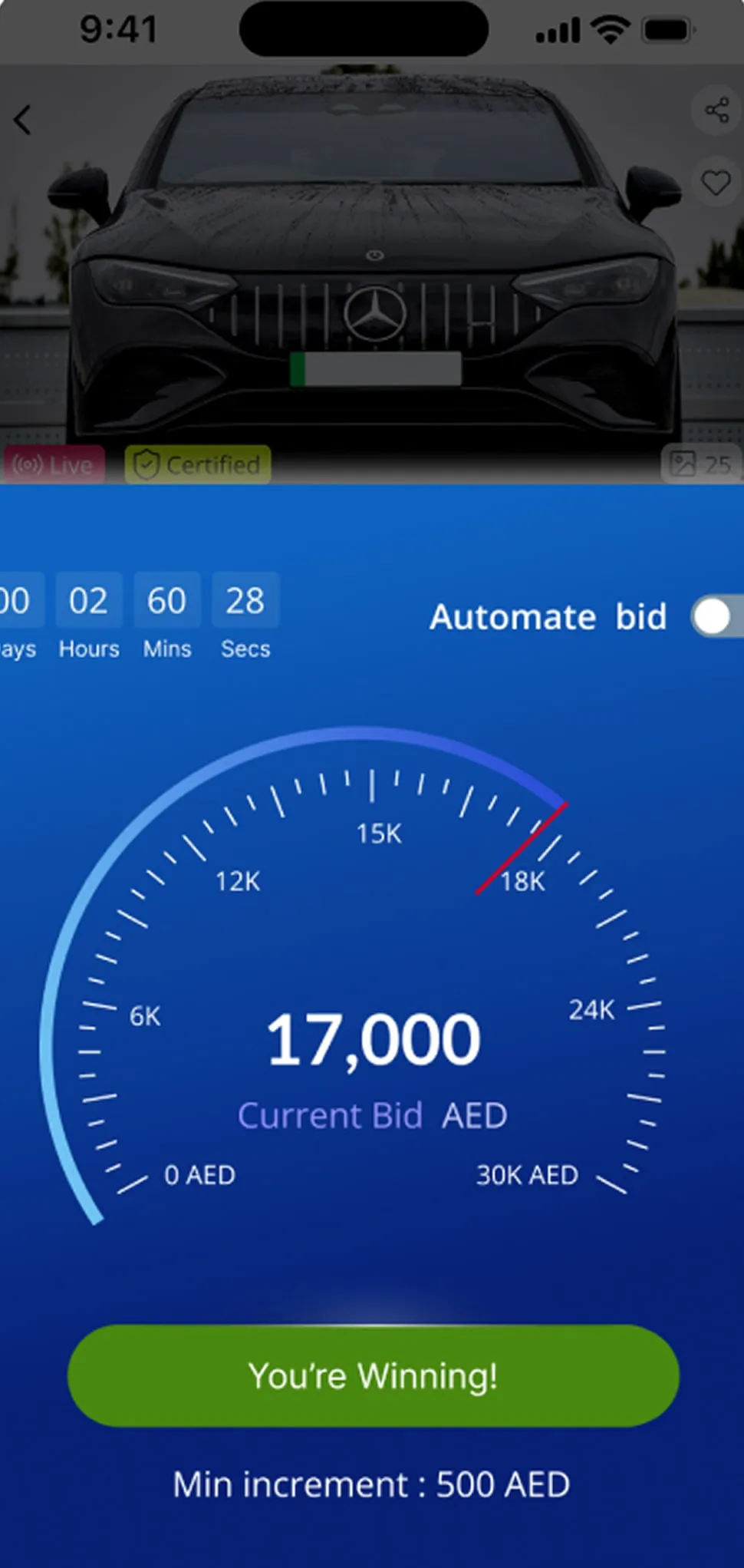
- Live bidding that stays accurate when many buyers bid in the same moment or the phone loses signal
- Payments by card, Apple Pay, Google Pay, wallet and direct bank transfer, each charged once however often it’s retried
- Separate flows for sellers, buyers and car inspectors, with inspection reports, chat, automated bidding, negotiation after the auction and delivery
- Camera VIN scanning that works without a connection, an in-app AI assistant, and push notifications at each step of an auction
Engineering notesConstraints, architecture, decisions and tradeoffs, for engineering readers.
Constraints
- The server decides. It is the only source of truth for who is winning, and it accepts one bid per car at a time. Everyone watching a car has to see the same price.
- Deposits set the limit. To join an auction, a buyer pays a deposit into their Carwa wallet. Deposits come in tiers, and a higher one lets the buyer bid more before reaching their limit. The server’s deposit check is the one that counts.
- “You’re winning” has to be true. A buyer who sees it may stop bidding, so a wrong one can cost them the car. The app only shows what the server has confirmed. With money involved, it can’t guess.
- Phones lose signal. Buyers bid over mobile networks that drop. A lost connection must never send a bid twice, or leave a stale price on screen.
- Late bids move the clock. In a live auction, each car gets its own time slot, one after another. A late bid extends the current car’s slot and pushes every later car back by the same amount.
- Paying is never a guess. Users can retry a failed payment without worrying about a second charge. A fee they’ve already paid shows as paid, not as a new charge.
Architecture
The app holds a WebSocket connection to the auction server. Its auction state is always a reflection of the server’s: the app never decides on its own who is winning.
The code is split into layers by responsibility: data, domain, application and presentation. Dependency injection wires them together, and also decides whether two screens share one instance of an auction or get their own.
- One shared connection layer owns the socket: authentication, reconnection and joining auction rooms.
- One component per auction handles that auction’s bidding and keeps its screens up to date.
When the connection drops, the app:
- disables the bid button and shows “Reconnecting”
- retries, waiting a little longer after each failed attempt
- once connected, rejoins its auction rooms and pulls fresh bids and the auction’s status
- only then enables bidding again
Sending a bid: the app sends on a connected socket, then waits for the server to acknowledge that bid. If the connection drops before the acknowledgement arrives, it doesn’t resend. After reconnecting, it checks the fresh bids to see whether the bid landed, and only then tells the buyer whether it went through.
Late bids: the server extends the countdown when a bid lands on the car currently up for auction, in the last 60 seconds of its slot, during a live auction. Each of those bids adds 60 seconds to the time left rather than resetting the clock to 60: a bid with 50 seconds left makes it 110. Every later car’s slot and the auction’s end time shift by the same amount, and their end-of-slot jobs are rescheduled. The app shows the new times as the server sends them.
The in-app AI assistant uses retrieval-augmented generation: the server finds the passages most relevant to a question with vector search, and the model answers from them. Answers stream in as they’re written, past chats stay in a history, and usage is capped per user.
Decisions and alternatives
Wait for the server before showing a bid
The alternative was an optimistic update: show the bid straight away and take it back if the server rejects it. I chose to wait, because here rejections are normal:
- Bid races. Other buyers bid at the same moment, and the server handles one bid per car at a time. Being outbid in that window is routine.
- Deposit checks. The server’s check is the authority, and the app’s own estimate is known to come out lower than the server’s.
- Everything else: rate limits, a slot that has just ended or been extended, and external auctions that confirm later.
With rejections that common, an optimistic bid would often appear and then vanish, and a wrongly shown bid can cost a buyer the car. A short spinner after each bid is a small price for that.
Try it
Bid against two simulated bidders. Raise the network delay or drop the connection to see what the app does, and open “Show what’s happening” to read each message between the app and the server.
No bids yet
Time left
1:15
Connected
Show what’s happening
Start the auction and place a bid to see each message between the app and the server.
Let the server settle every payment
Card and wallet payments go through Stripe, and bank transfers through Lean. Every payment ends in success or failure, and the server, told by the payment providers’ webhooks, settles the final result. The app’s job is to make each outcome safe and clear:
- Failed: a “Payment failed” alert appears, and the payment sheet stays open with what the user entered, ready to retry straight away. A retry with the same details reuses the same idempotency key, and the payment provider treats it as the same payment, not a second charge.
- Canceled: closing Apple Pay or Google Pay quietly resets the sheet. It isn’t treated as an error.
- Low balance: a wallet that can’t cover the payment opens a top-up sheet instead of an error.
- Already paid: fees such as the inspection fee check first. If the user has paid, the app says “Already paid” rather than asking for the money again.
- Interrupted: nothing resumes on the device. The next time the user looks, they see what the server recorded in their balance and transactions.
Scan VINs on the device
A car’s VIN is read with Google ML Kit, which runs barcode scanning and text recognition on each camera frame. It runs on the phone rather than on a server because it reads live video frame by frame, which a server round trip can’t keep up with. It also works without a connection in garages, uploads no images and costs nothing per scan.
Misreads are guarded against in five ways:
- It tries the barcode first, which is exact, and only falls back to reading the text.
- It accepts only valid VINs. Anything else is treated as a misread.
- It scans continuously until it gets a valid read.
- It uses a high camera resolution and has a flash toggle.
- The result lands in a field the user can edit, and the server’s VIN lookup checks it.
What I’d do differently
Plan for the bad day early. On live bidding, I put most of the early design into the main flow. In hindsight I’d design for poor connections from day one, because that’s when users need the app most. Now “what happens when it fails?” is one of my first system design questions.