Goidentity · Case study
Identity checks from a phone, with bad photos caught before they’re sent
- Industry
- Identity verification
- Platforms
- iOS, Android
- Year
- 2025
Outcome
The problem
Organizations often check who someone is by looking at photos of their ID by hand, which is slow for the person waiting and easy to get wrong. A blurry or glary photo usually comes to light only after it’s sent, which means starting again.
What I built
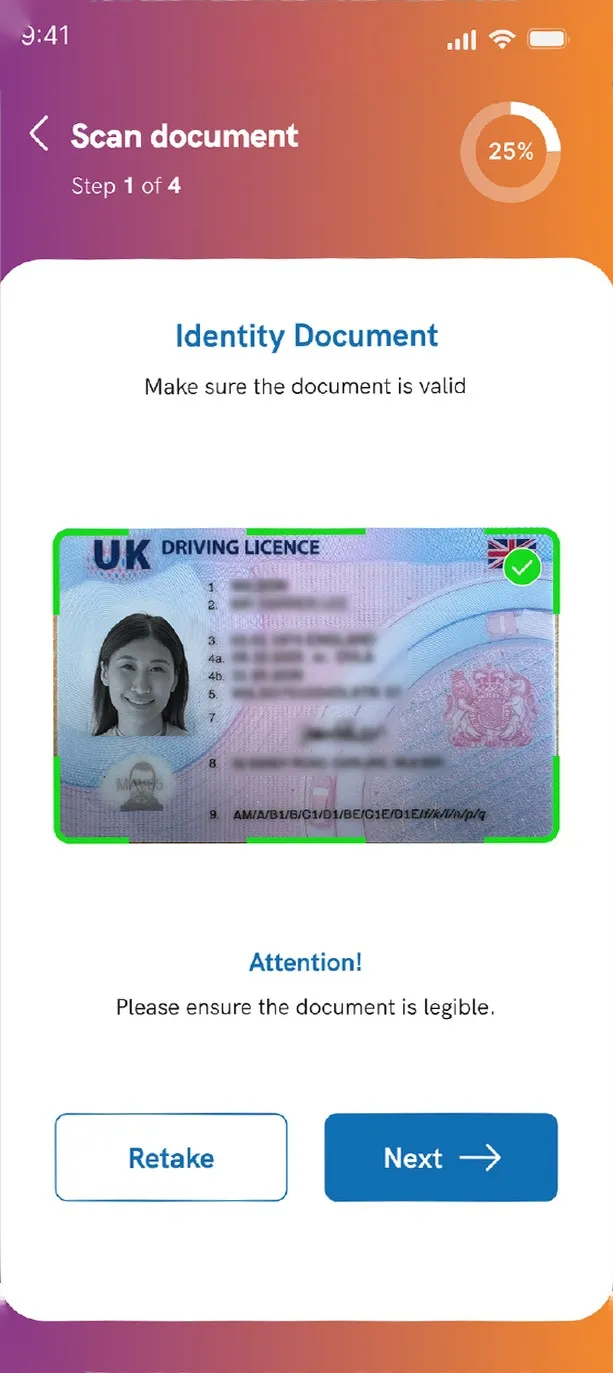
- A verification flow where people scan a passport, ID card or driver’s license, then take a selfie with a blink check, and the backend that runs the document, sanctions and politically-exposed-person checks side by side
- Photo checks on the phone that flag blur, glare and low resolution the moment a photo is taken, before anything is sent
- A standalone, documented plugin that adds the camera and blink check to an app on iPhone and Android
- ID photos and selfies that are never saved on the phone, and automated builds that put signed test versions on both stores
Engineering notesConstraints, architecture, decisions and tradeoffs, for engineering readers.
Constraints
- The phone is not a safe place to keep anything. The app handles identity documents and face images, and none of it may stay on the device.
- Fix it before it’s sent. Problems the user can fix, like a blurry photo, have to be caught on the phone, not after an upload.
- Talk to the server as little as possible. The app relies on a small, deliberate set of backend calls, which keeps the integration simple.
- No secrets in the app. Provider certificates and signing keys must never ship inside it.
- The vendor’s camera wants the whole screen. The capture SDK expected to take over the display, and the flow still had to look like Goidentity.
Architecture
Organizations invite users to verify. Each user picks a passport, ID card or driver’s license, scans it, then takes a selfie with a blink check. Capture runs on the device: images that are blurry, affected by glare or too low in resolution are rejected straight away, and the user retakes them on the same screen. Images stay in memory instead of being saved.
When the user submits, the backend takes over. I led its .NET API development:
- Checks run side by side. Document authentication, biometric face matching and passive liveness go through Thales, over mutual TLS. Sanctions and PEP (politically exposed person) checks run at the same time, each as a queued job, so the wait is as long as the slowest check rather than all of them added up.
- A mismatch goes to a person. If the details read from the document don’t match the ones provided at the start, the verification fails and is routed to manual review.
- Credits count once paid. A Stripe top-up adds credit only when Stripe’s webhook event confirms the payment.
- Sign-in is hardened. Malicious users get nothing useful from it.
The organization that asked for the check gets a verification report.
The camera and blink check come from a third-party capture SDK, which I wrapped in a plugin with native code for iOS and Android:
- Callbacks on the right thread. Every callback moves from the SDK’s background threads to the main thread before it reaches the app’s shared code.
- One liveness result. The camera reports a result for every frame. I throttled those and reduced them to one final outcome.
- The same rules on both platforms. iOS and Android accept and reject the same way, because the image-quality rules live in shared code.
- Canceled is not failed. A user who closes the camera sees a different result from a capture that went wrong.
Decisions and alternatives
Wrap the SDK, not the product
I kept the plugin’s job to wrapping the vendor SDK. It exposes capture, quality checks and liveness through a small typed interface. The verification flow, backend calls and branding all stay in the app. The plugin follows the framework’s platform-interface structure, which lets tests swap in fakes.
The code started out inside one app, and I extracted it into a standalone, documented package. It gives apps two options: open the vendor’s full-screen camera with one call, or place the camera views inside their own screens.
A different camera approach on each platform
On iOS I nested the SDK’s native camera view inside the app’s own UI, which kept the flow on-brand. On Android I tested the same approach, then chose the vendor’s full-screen camera because it was more reliable. I gave up a matching look on both platforms to get a camera that works every time.
Keep provider keys off the phone
I put the integration with the verification provider in the backend API rather than in the app. The backend connects to the provider over mutual TLS. Provider certificates and signing keys never ship inside the app, credentials can be rotated without an app release, and the app only ever talks to our API.
The rest of the app follows the same rule:
- Captured documents and selfies exist only in memory. They’re never written to the gallery or app storage, and the one temporary file a native SDK creates is deleted as soon as it’s read.
- Uploads go over HTTPS only, with no cleartext exceptions on either platform.
- At launch, the app checks for a rooted or jailbroken device. If it finds one, it blocks the app from being used at all.
Catch what the user can fix, escalate only what’s unclear
- A bad photo: blur, glare and low resolution are flagged right after capture. The user rescans on the same screen instead of finding out after an upload.
- A dropped connection: captures stay in memory until the upload succeeds. Recovering takes one tap on Try Again, not a rescan.
- Server errors: only read requests are retried automatically. A verification that gets an error back from the server is not re-sent.
- The result: users always see the same neutral confirmation, never a pass or fail. That keeps the experience calm and gives nothing away to someone trying to game the checks.
- The decision: the organization gets the outcome. Clear failures are rejected automatically, and borderline cases are flagged for the organization’s own staff to review in their dashboard.
Testing and release
A CI pipeline turned a merged release branch into signed builds on both stores’ internal testing tracks:
- reusable steps for each platform
- signing material decoded into a temporary keychain at build time, and config for each environment
- unique build numbers, fetched from the App Store Connect and Google Play APIs
- automated security scans
Rolling out to production stayed a deliberate manual step.
What I’d do differently
- Run quality checks on every pull request. This makes failures easier to trace to the change that introduced them.